
When it comes to API testing, Postman is one of the most popular tools for creating and running collections.
Newman is Postman’s command-line runner that lets you execute Postman collections quickly, consistently, and automatically—without needing the Postman UI.
What is Newman?
Newman is a command-line tool that allows you to run Postman collections directly from your terminal or scripts.
- Automated API testing
- Running tests using environments
Prerequisites
- Node.js installed (Newman runs on Node).
- A Postman collection (created or exported).
- A Postman environment file.
Step 1: Install Newman
- npm install -g newman
Verify the installation:
- newman –version
Step 2: Run a Postman Collection
- newman run MyCollection.json
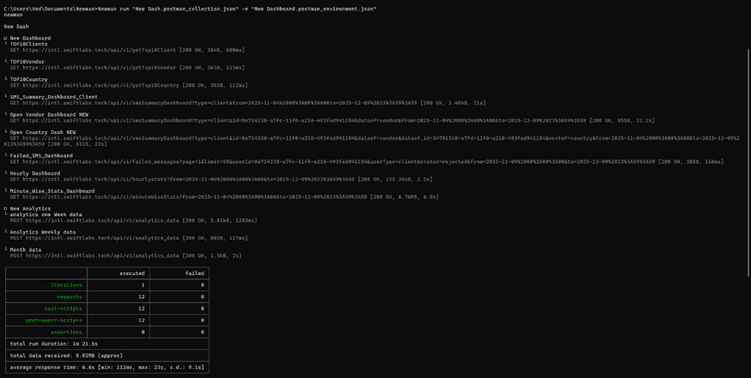
Newman will execute all requests and display results directly in your terminal—complete with response times, test results, and failures.
Step 3: Run the Collection with an Environment File
- newman run MyCollection.json -e MyEnvironment.json
This ensures your endpoints, tokens, or environment variables are correctly applied.
Step 4: Generate Reports in CSV:
CSV reporting is helpful when you want to analyse test results in Excel, import them into dashboards, or share simple pass/fail data with your team. Newman supports CSV reports through an external reporter.
1) Install the CSV Reporter
npm install -g newman-reporter-csv
2) Run the Collection with the CSV Reporter
newman run “MyCollection.json” -e “MyEnvironment.json” -r csv –reporter-csv-export results.csv

What You Get in the CSV File
The generated results.csv file includes structured data such as:
- Collection Name
- Request name
- Request method
- URL
- Response code
- Response time
- Response size
- Assertions (pass/fail)
- Error messages (if any)